
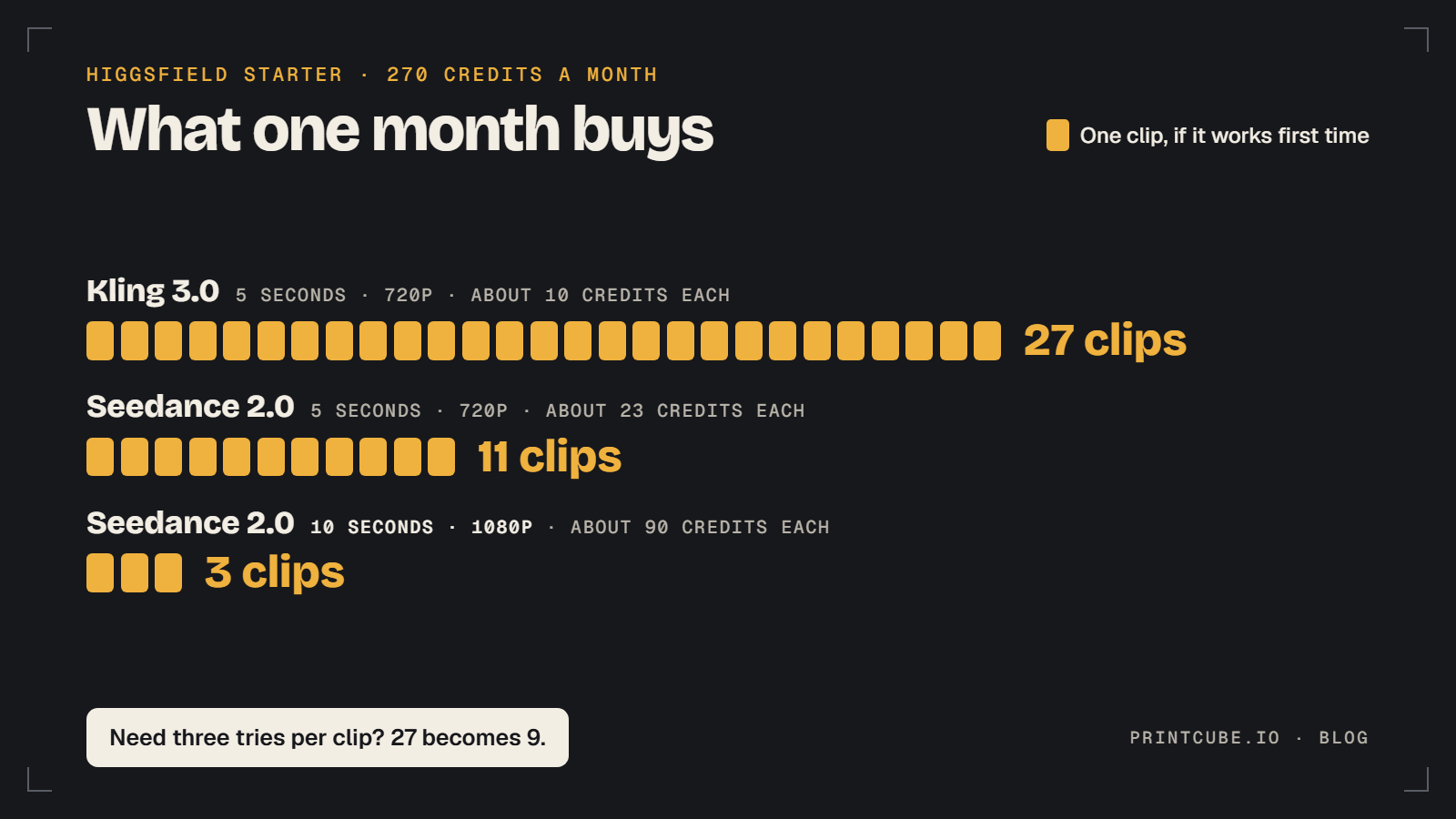
Higgsfield has three paid plans: Starter at $19 a month, Plus at $59 and Ultra at $129. You're buying credits, not videos. Starter's 270 credits come to about 27 short, basic clips if every one works the first time, and closer to nine you'd want to post once you count the retries.
Higgsfield pricing: the plans and what you get
These are the figures on Higgsfield's pricing page as of early October 2026.
| Plan | Monthly billing | Annual billing (per month) | Credits per month |
|---|---|---|---|
| Starter | $19 | $19 | 270 |
| Plus | $59 | $47 | 1,200 |
| Ultra | $129 | $99 | 3,000 |
If you've seen other numbers elsewhere, that's because the lineup has moved more than once this year, and plenty of older pages were never updated. Even Higgsfield's own blog still mentions a Basic plan with 120 credits and a Plus plan with 1,000. There's also a free plan with limited use. So check Higgsfield's pricing page on the day you sign up and trust that over anything else, this article included.
Now divide price by credits. On Starter, each credit costs you about 7 cents. On Plus it's about 4.9 cents, and on Ultra about 4.3 cents. So the cheapest plan has the most expensive credits. That's normal for this kind of pricing, but it means a clip costs a Starter customer roughly 40% more than it costs someone on Plus.
What the credits buy in listing videos
Say you have 12 designs in your shop and you want one short clip per listing.
The cost of a clip depends on three things: which AI model you pick, how long the clip is, and the resolution. Higgsfield's blog gives these approximate figures for a 5-second clip at 720p:
- Wan 2.7: 8 credits
- Kling 3.0: 10 credits
- Seedance 2.0: 23 credits
- Cinema Studio: 25 credits
On Kling 3.0, your 12 clips cost 120 credits. That fits inside Starter with 150 credits to spare, and each clip costs you about 70 cents. The same 12 clips on Seedance 2.0 would need 276 credits, which is just over the whole plan. On that model, 270 credits covers 11 clips.
Longer and sharper clips cost a lot more. At 10 seconds and 1080p, Wan 2.7 and Kling 3.0 both cost 25 credits. Seedance 2.0 jumps to 90 and Cinema Studio to 100. Starter would give you three 10-second 1080p Seedance 2.0 clips for the month, at a little over $6 each.
Then there are retries. AI video doesn't always get it right. The print can warp, the shirt can move oddly, or the result can just look off. Each retry costs the same as the first attempt. If it takes you three tries to get one clip you're happy with, a Kling 3.0 keeper costs 30 credits, not 10. Your 270 credits now make nine keepers, not 27, and each one has cost you a little over $2.
So with 12 designs on Starter, plan on covering about three quarters of your shop in the first month. On Plus, the same three-tries habit would use about 360 of your 1,200 credits for all 12.
You don't have to guess any of this as you go. The credit cost appears on the Generate button before you confirm, so you can change the model, length or resolution and watch the number move. Go by that number over any list, this one included: Higgsfield's pricing page shows some models a little lower than its blog does. Higgsfield explains the mechanics in its help center page on how credits work.
Turning a mockup into a short video for TikTok and Etsy
Higgsfield describes two routes. The first is image-to-video. You upload your mockup, describe the motion you want, pick a model and generate. The second is Marketing Studio, which is built around product clips and uses templates, so you start from a ready-made ad style and don't have to write a prompt from scratch.
Marketing Studio clips can run up to 15 seconds. Higgsfield puts an 8-second product clip at about $2 at 720p and $4 at 1080p. Those estimates work out to a credit price of around 5 cents, which is close to what Plus customers pay. On Starter, where each credit costs about 7 cents, the same clip comes to roughly $2.80 and $5.60.
For a new seller, plain image-to-video on Kling 3.0 or Wan 2.7 is the cheaper way to start. Marketing Studio makes more sense once you know which designs deserve a more polished ad.
What can you do with 5 to 15 seconds? More than you'd think.
- In an Etsy listing: a short clip can show the product from a second angle, or on a person, or in a room. It doesn't need a story.
- On TikTok: a short clip works as a building block. You can post it alone, or stitch a few together with text and music in a free editor.
Before you generate a batch, check two things. Look up Etsy's current rules for listing videos. Then confirm in Higgsfield which aspect ratios you can export, because TikTok wants vertical video. A set of clips in the wrong shape is wasted credits.
Limits and common complaints
The same handful of complaints come up from people who pay for Higgsfield. Most of them can be softened with a few habits.
Credits disappear on retries
This is the biggest complaint. Higgsfield itself says re-rolls drain credits fastest and that resolution tends to be the biggest multiplier. Its blog post on why video credits run out goes through this.
The habit that helps is to test cheap. Run your first attempts at 5 seconds and 720p on Wan 2.7 or Kling 3.0. Only pay for 1080p or a longer clip once you have a prompt and a mockup that work. A clean, well-lit mockup with the design clearly visible also gives the model less to get wrong.
Credits expire
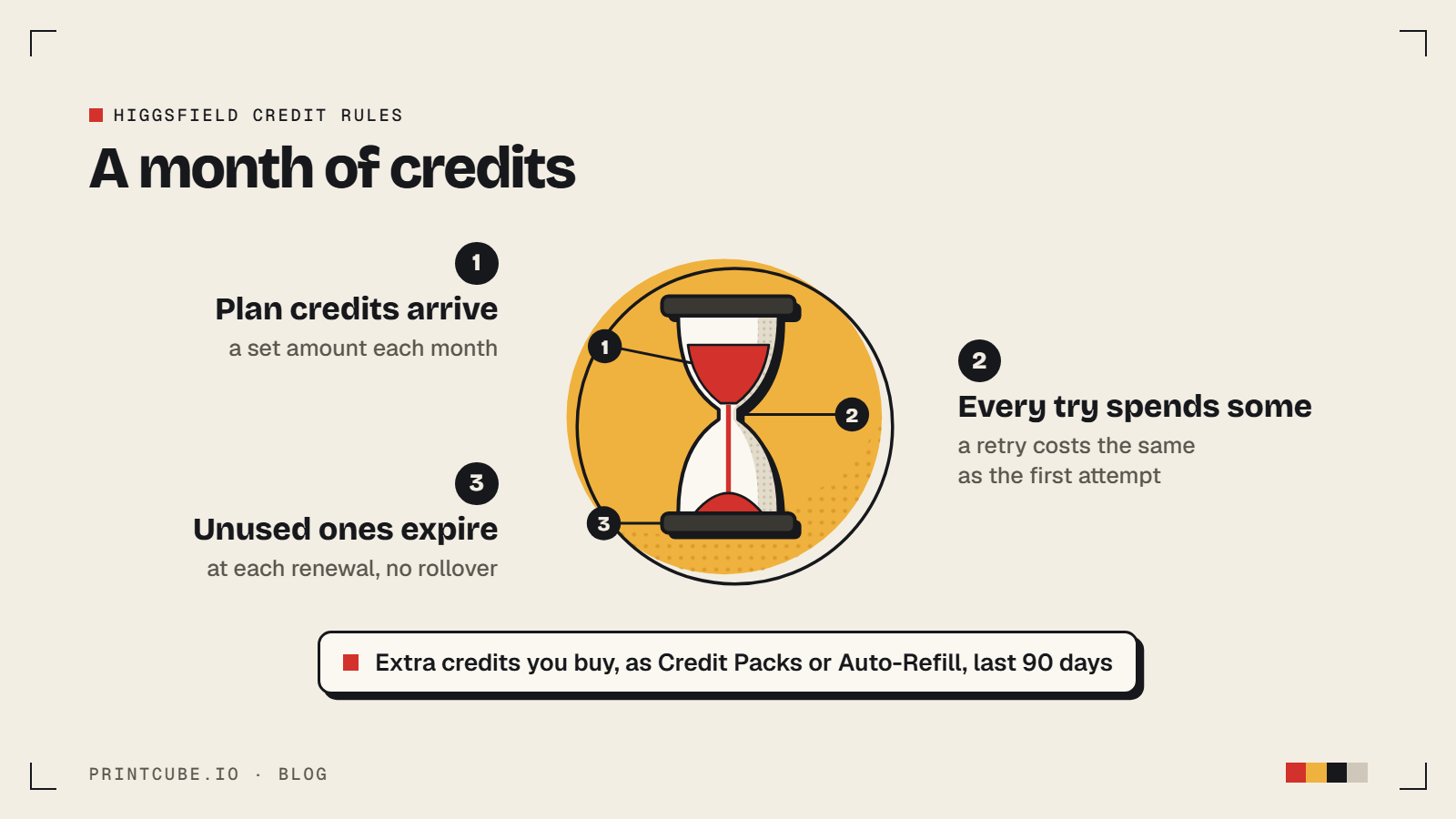
Buyers report losing credits they hadn't used, and Higgsfield's help center confirms why: subscription credits don't roll over, and unused ones expire at each renewal. Treat each month's credits as use-it-or-lose-it, and plan a session or two each month so they don't sit there unused.
Generations get stuck
Some users describe clips that hang or fail. Higgsfield's usage history logs every generation and shows credits returned for failed ones, so check there first. If credits are still missing, you'll have the details to give support.
The price, and charges people didn't expect
$19 a month is $228 a year, which is a real cost for a shop with only a few sales. Some buyers also report being surprised by subscription charges, usually a renewal they forgot or an annual plan they thought was monthly. Read the checkout screen carefully, and set a calendar reminder a few days before your renewal date.
What to check on Higgsfield's site before you pay
Some terms decide whether a plan is a good deal for you, and they change often. Read them on Higgsfield's own site the day you subscribe. Ten minutes with the pricing page, the help center and the Terms of Use Agreement should cover this list:
- Free plan. Higgsfield lists a free plan with limited use. See what it lets you make with your own mockups before you pay.
- Commercial use. You need the right to use the clips in listings and ads. Confirm that your plan includes it.
- Rollover and expiry. Subscription credits don't carry into the next month. Check that hasn't changed.
- Top-up packs and auto-refill. You can buy Credit Packs, and Auto-Refill tops you up when your balance drops below a threshold you set. Both kinds of credit expire 90 days after purchase, so check how Auto-Refill is set on your account.
- Failed generations. The usage history shows credits returned for failed generations. Check what happens with a clip that only hangs.
- Refunds and cancellation. Know how to cancel, and what happens to your remaining credits when you do.
- "Unlimited" offers. If a plan advertises unlimited anything, check which models it covers and whether video is included.
- Starter's annual price. It's the same $19 a month whether you pay monthly or yearly, so there's nothing to gain by committing for a year on Starter.
Is Higgsfield worth paying for
It depends on where your shop is.
You have no sales yet. I'd skip it for now. Video won't fix a weak design or a listing nobody finds. Your $19 and your time are better spent on your designs, titles and photos first.
You have a small catalog and some sales. Starter is a fair way to find out whether video helps you. Stick to 5-second 720p clips on Kling 3.0 or Wan 2.7 and expect nine to eleven usable clips in the month. Put them on your best listings and see whether anything changes. Nobody can promise it will, so treat it as a one-month experiment.
You're posting to TikTok several times a week or have dozens of listings. Plus makes more sense. The credits are about 30% cheaper each, and 1,200 of them leaves room for retries and a few 1080p clips.
Ultra. Most small sellers won't need it. 3,000 credits a month is a lot of product clips for one shop.
Annual billing. It saves $12 a month on Plus and $30 a month on Ultra, and nothing on Starter. That's real money, but it's a poor first move. Pay monthly until you've used the tool for a month and know you'll keep using it.
Higgsfield isn't the only option. Runway, Kling and Pika are other AI video tools you can compare. If you just want moving text and music over your mockup photos, an editor like CapCut may be enough without any AI video.
FAQ
How many videos can I make on the Starter plan?
With 270 credits, about 27 five-second 720p clips on Kling 3.0, or 11 on Seedance 2.0, if every clip works the first time. With retries, plan on about nine good clips on the cheaper models. At 10 seconds and 1080p on Seedance 2.0, it's three.
Why do I see different Higgsfield prices on different sites?
The plans have changed more than once in 2026, and many older pages were never updated. Even Higgsfield's own blog still mentions a 120-credit Basic plan. Higgsfield's live pricing page is the one to trust.
How long can a Higgsfield product video be?
Marketing Studio product clips run up to 15 seconds. Longer clips cost more credits, so make your test versions short.
Does a higher resolution cost more credits?
Yes, and by a lot. Higgsfield says resolution tends to be the biggest multiplier. For example, a Seedance 2.0 clip goes from 23 credits at 5 seconds and 720p to 90 credits at 10 seconds and 1080p. You'll see the exact cost on the Generate button before you commit.
Should I pay monthly or annually?
Start monthly. Annual billing brings Plus down to $47 a month and Ultra down to $99, but you're committing for a year. Try the tool for a month first, and read the refund and cancellation terms before you switch.